Android · offline finance

Your money stays on your phone.

One private ledger for subscriptions, debts, daily spending and bank accounts — kept in the app's sandbox, not on a server.

Open source No account Works offline v2.17.0

0 accounts required
0 trackers or ad SDKs
100% on-device storage
MIT open-source license

01 / The ledgers

Six ledgers.
One local record.

The totals reconcile because every screen writes to the same local store. Nothing waits for a sync.

01 Subscriptions

Every renewal, on the record.

Weekly to yearly cycles, monthly burn, trial alerts and reminders scheduled on-device. Cancellation guides cover Netflix, Spotify, Amazon, YouTube, Disney+, Apple Music, ChatGPT, GitHub, Adobe and Microsoft.
02 Debt & credit

Two sides of the ledger.

Money you owe and money owed to you stay separate. Record a partial settlement and watch the remaining balance change.

03 Daily spending

The month, in thirty squares.

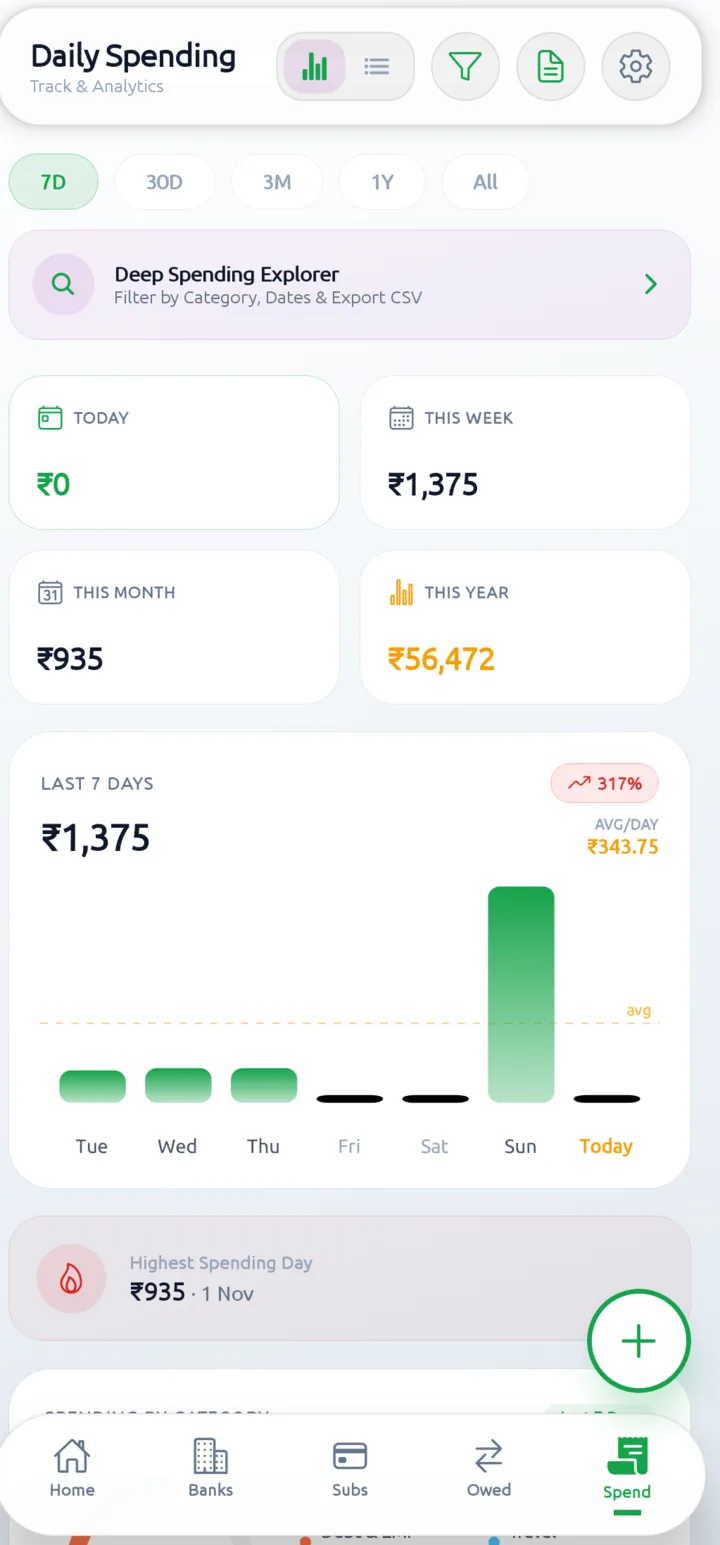
Custom categories and colors, a monthly budget with category limits, weekly and monthly charts. Attach the receipt photo.

04 Bank accounts

A passbook for every account.

Search transactions, transfer between accounts, compare monthly inflow and outflow, and export a PDF statement. Vector marks for HDFC, SBI, ICICI, Axis, Kotak, PNB, J&K Bank and more.

05 Snapshot cards

Share the position. Not the amounts.

Export a financial snapshot as a PNG in one of six themes. Privacy masking replaces every value with ₹••••••.

06 Vault & lock

Locks on the device. Not the cloud.

Biometric or PIN lock, a privacy overlay in recents, scheduled local snapshots, JSON backup and restore, plus CSV and PDF export.

Inside the build

This is the app,
not a render.

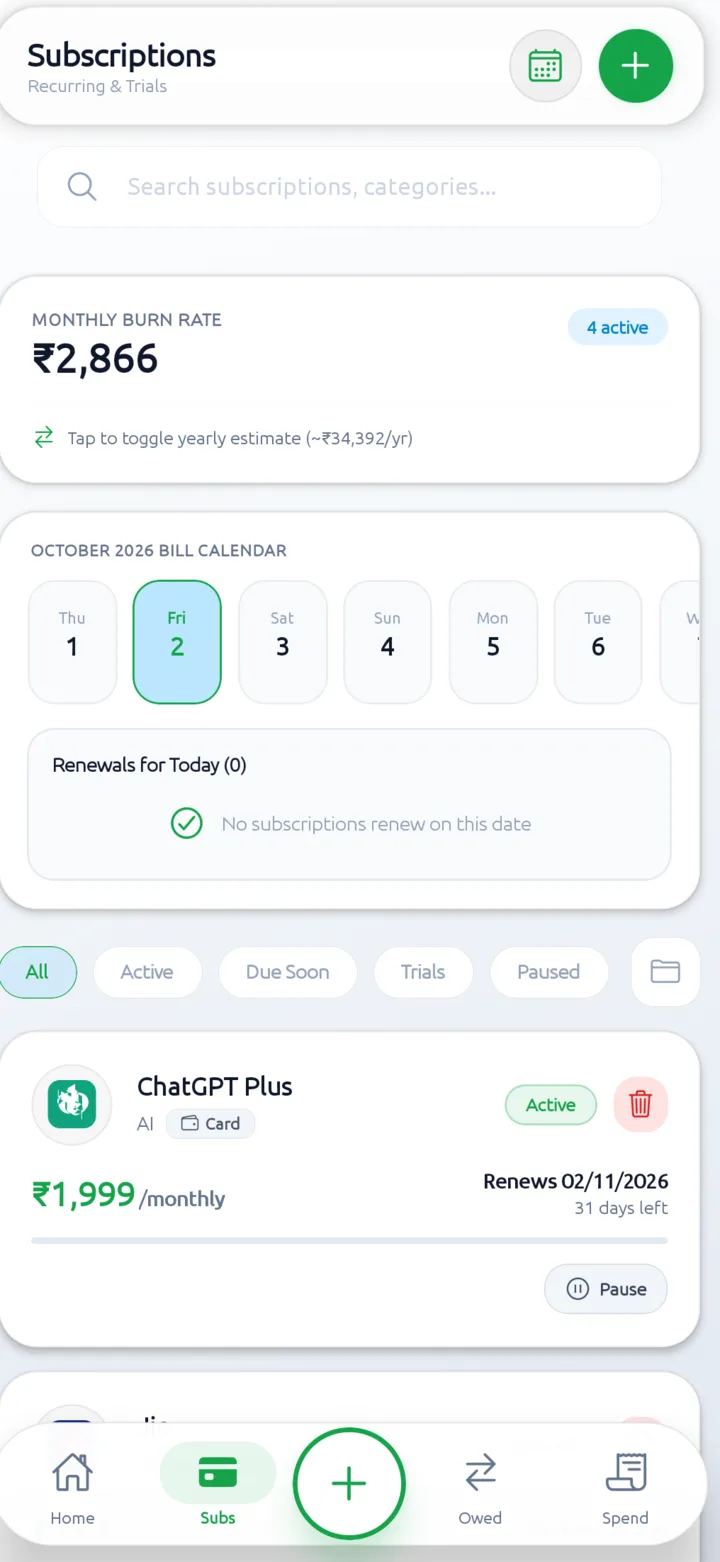
Three screens from the Android build. Light theme is shown; the app also ships with a dark theme in Settings.

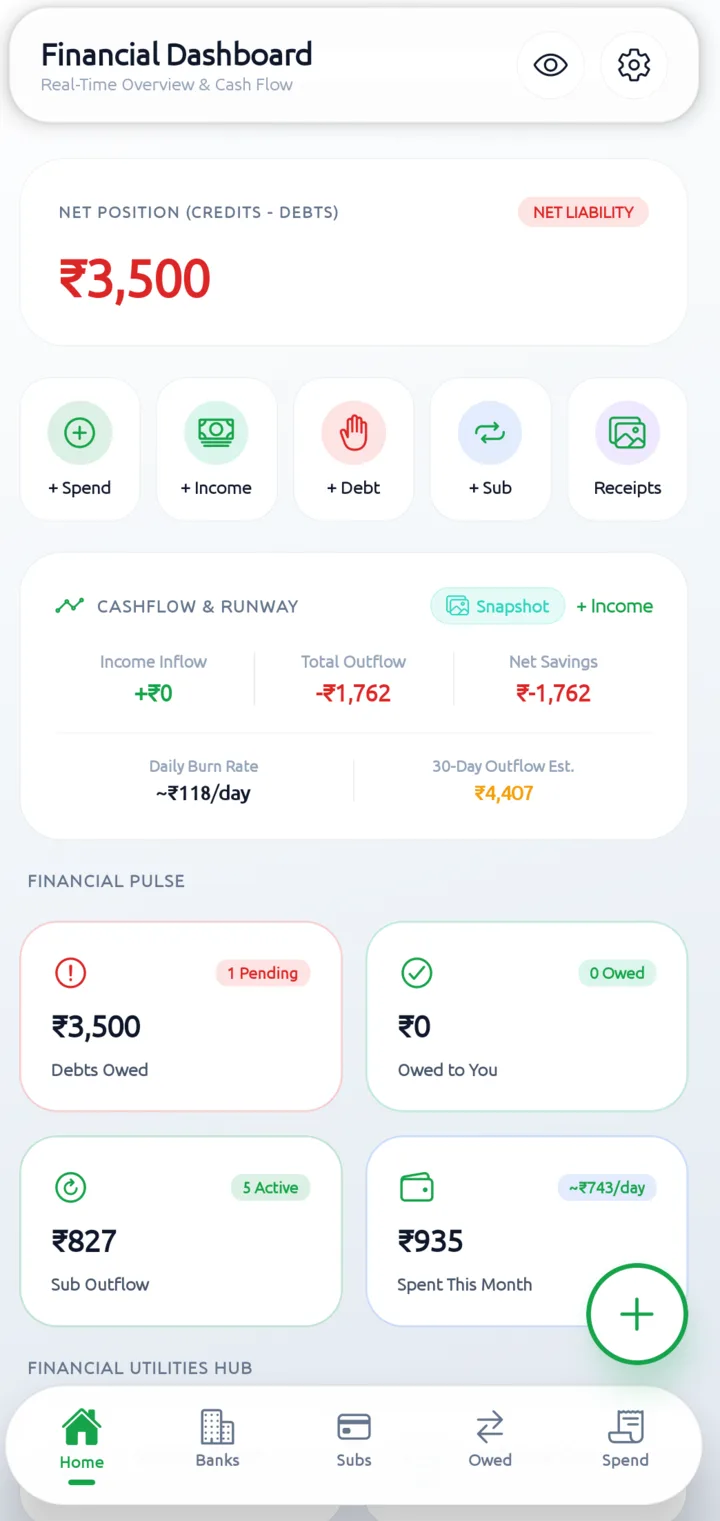
SubDebt dashboard showing a net liability, cashflow summary, debts owed, subscription outflow and this month's spending.
01 Dashboard

Net position, debt pulse, monthly burn and cashflow in one view.

Subscriptions screen showing the monthly burn rate, an October bill calendar and a ChatGPT Plus renewal card.
02 Subscriptions

Burn rate, renewal calendar, trials and per-service status.

Daily spending screen showing today, week, month and year totals with a seven-day bar chart and highest spending day.
03 Daily spending

Budget, category split, charts and the highest-spend day.

02 / Data handling

No cloud account to breach.

SubDebt writes to the app's private storage on your phone. There is no sign-up, no analytics pipeline, no ad SDK and no server-side copy of your ledger.

The only outbound request is an optional check to GitHub for a new release. It carries no ledger data. Read the full policy →

How SubDebt handles network access, tracking, storage, authentication and exports.
Data path What happens Destination
01 Network Optional check for a new GitHub release. No sync, telemetry or advertising requests. GitHub only
02 Tracking No analytics, advertising IDs, tracking SDKs or behavioral profiles. There is nothing to opt out of. Nowhere
03 Storage Records and receipt photos live in the app's isolated sandbox on your Android device. Your device
04 Auth No account. An optional biometric or PIN lock gates the app, and recents get a privacy overlay. Device hardware
05 Export JSON backup and restore, CSV and PDF files, and PNG snapshot cards — created only when you ask. Where you send it

03 / Utilities

Eight tools.
No upload button.

Calculators and planners run against the same local records. None of them need an account.

Install and open the toolbox →
  1. 01

    EMI calculator

    Principal, rate and tenure. See the schedule and total interest.

  2. 02

    Debt payoff planner

    Order balances by rate or size and see the month you clear them.

  3. 03

    Subscription forecast

    Project renewals forward, including trials that become charges.

  4. 04

    Financial calendar

    Renewals, EMIs and due dates in one month view.

  5. 05

    Health audit

    Review budgets, renewals and dues in one periodic check.

  6. 06

    Currency converter

    Convert amounts between currencies as you record them.

  7. 07

    Reminder generator

    Create a local reminder for anything with a date.

  8. 08

    CSV import

    Bring existing rows into the ledger from a CSV file.

04 / Snapshot cards

Share the position,
not the amounts.

Export a financial snapshot as a PNG. Six themes. One mask for every value.

SubDebt08 / 26
Net position ₹•••••• All accounts
Theme 01Subs ₹••••
SubDebt09 / 26
Net position ₹•••••• All accounts
Theme 02Owed ₹••••
SubDebt10 / 26
Net position ₹•••••• All accounts
Theme 03Burn ₹••••
SubDebt11 / 26
Net position ₹•••••• All accounts
Theme 04Subs ₹••••
SubDebt12 / 26
Net position ₹•••••• All accounts
Theme 05Owed ₹••••
SubDebt01 / 27
Net position ₹•••••• All accounts
Theme 06Burn ₹••••

Sample values. The mask is a share-time control, not a redaction of your local ledger.

05 / Install

Install once.
Own the ledger.

Version 2.17.0 for Android. Google Play handles updates; the APK and Obtainium routes are there if you prefer them.

  1. 01

    Install from Google Play, or download the APK and allow installs from your browser.

  2. 02

    Set your base currency, monthly budget and first spending category.

  3. 03

    Turn on app lock, then export a JSON backup before adding months of history.

06 / Questions

The short answers.

The privacy model is simple enough to fit on one page. The support page has the rest.

Support and contact →
Is SubDebt free?

Yes. The app is free, MIT licensed and has no ads. The source is on GitHub.

Does it need an internet connection?

No. The ledger works offline. The app may make one optional request to GitHub to check for a new release, and links you tap open in your browser.

Where is my data stored?

In the app's private storage on your Android device. There is no account and no server copy.

How do I back up or move phones?

Data Vault keeps scheduled local snapshots. Settings exports a JSON backup that restores on another install; CSV and PDF cover statements and records. Keep the file somewhere you trust.

Does it read my SMS or connect to my bank?

No. It does not read messages, link to bank accounts or move money. Bank ledgers are recorded manually.

Is there an iOS version?

No. SubDebt Manager is Android only: com.subdebt.app.

Who builds it?

Zer0k7 Lab. The Android code is public under the MIT license, so the network claims are inspectable.